

DICOM node architecture & security
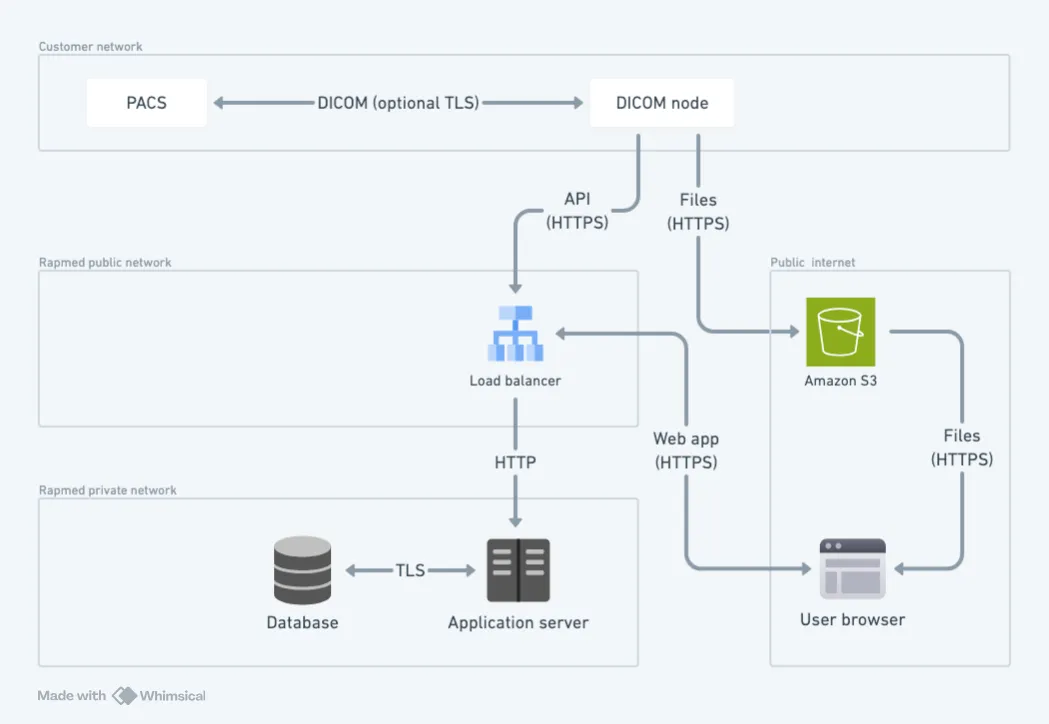
The rapmed DICOM node allows direct file uploads from your PACS into rapmed. It’s installed inside your network, typically on a VM provided by your IT services, and runs as a container compatible with any Linux VM that supports Docker or an equivalent container runtime. rapmed handles monitoring and updates; setup requires either remote VM access (SSH) or cooperation with your IT department to configure it so uploaded files land in the right rapmed account.
Technical requirements
Section titled “Technical requirements”- CPU: 1
- RAM: 1 GB
- Storage: 10 GB
- Linux distribution with container runtime support
- Fixed internal IP address
- Inbound: port 8104/TCP from your internal network (PACS connectivity)
- Outbound: no internal network access beyond established connections; unrestricted internet access
What the node does
Section titled “What the node does”- Receives files sent from the PACS over the DICOM protocol (DICOM Store SCP), storing them temporarily on local disk until anonymization completes.
- Anonymizes files using the same anonymizer as the regular rapmed web app, following DICOM standard attribute confidentiality profiles to remove private/personal information.
- Uploads files to rapmed storage over HTTPS with modern TLS, matching the security standards of the regular web application.
Securing PACS ↔ node communication
Section titled “Securing PACS ↔ node communication”- Restrict port 8104 access to your PACS server(s) via firewall rules, and/or
- Use mTLS for encryption and authentication.
Data storage and access
Section titled “Data storage and access”Data is stored within Europe, per data protection policy. Access requires a standard rapmed account with the appropriate workspace permissions — files uploaded through the DICOM node behave exactly like files uploaded through the regular web application.